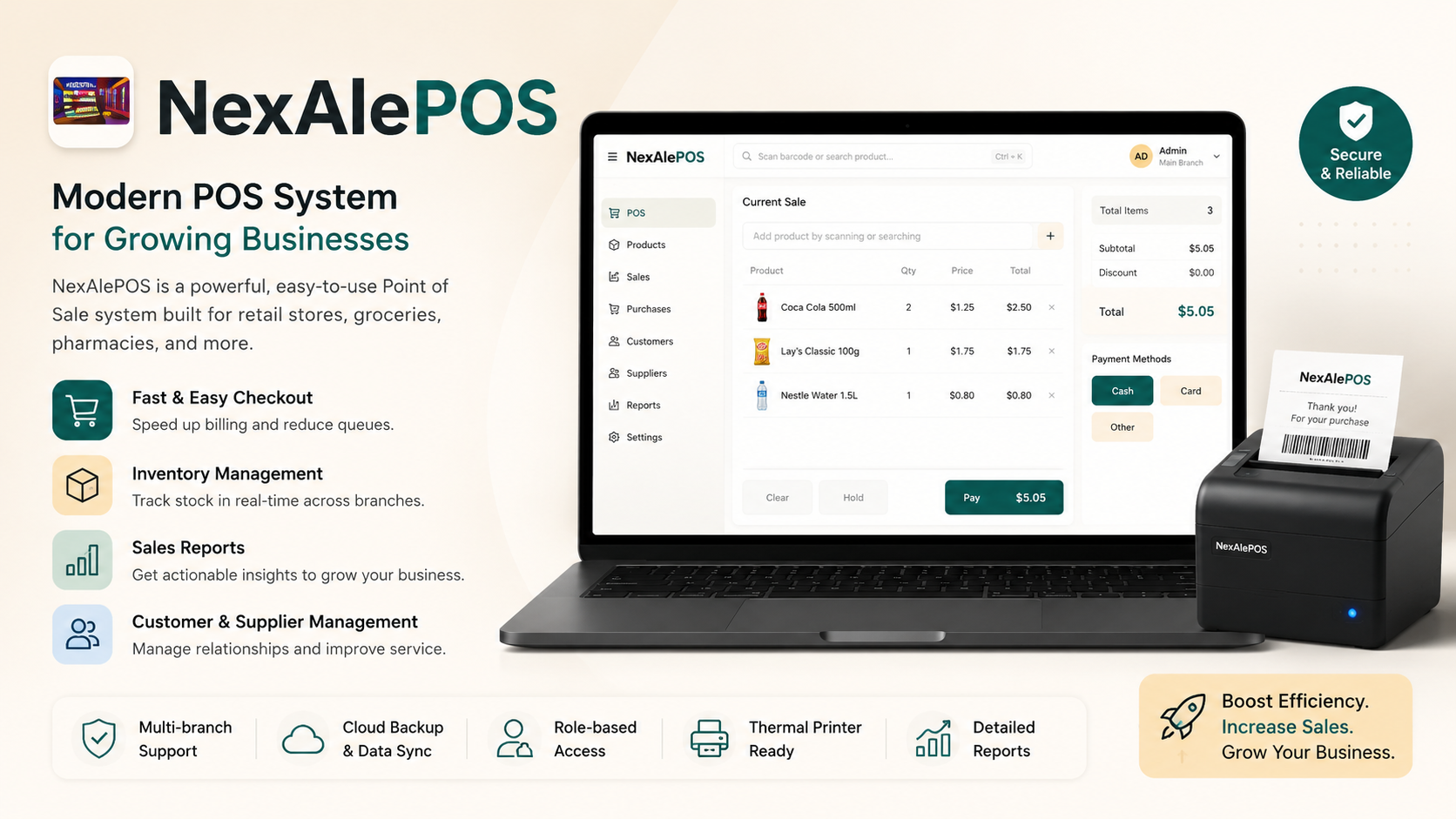
Something meaningful is happening for small shop owners today, and I want to make sure you hear about it properly.
NexAlePOS is officially available. Not as a beta test. Not as a limited early access. Fully available, right now, to any shop owner who is ready to run their business with a proper, professional system that actually serves the reality of day-to-day retail.
This is not a product announcement from a huge software company with a marketing budget and a complicated pricing structure. This is a purpose-built tool created specifically for small and medium retail shop owners who have been managing their businesses with whatever they could piece together, and who deserve something better.
This article is about what NexAlePOS is, why it was built, what it gives you, and whether it's the right fit for where you are right now. If you've been waiting for the right moment to upgrade how your shop operates, this might be that moment.
What NexAlePOS Is, in Plain Terms
NexAlePOS is a point-of-sale system. That means it handles your sales transactions, your inventory, your customers, your team, and your reporting, all in one place.
It runs in a browser, so it works on any device you already own. It's built on PHP and MySQL, which are among the most reliable web technologies available, used by millions of websites and applications around the world. It lives on your own web hosting account, which means your data is under your control, not stored on a third-party server you can't access or influence.
And crucially: it is a one-time purchase. You pay for it once, you own it, and it runs for as long as your business does. No monthly fees. No subscription tiers. No features locked behind an upgrade.
Who Built It and Why
NexAlePOS was built for the kind of shop owner who is tired of managing their business through a combination of a cash register, a spreadsheet, and hope.
The people behind it understood that the software options available to small retailers were mostly designed for either very basic use or enterprise-level operations. There was a gap. Small shops that needed something real, something with actual inventory management and customer records and proper reporting, were either paying monthly for cloud-based systems that kept raising their prices, or making do with tools that weren't built for retail.
NexAlePOS fills that gap. It's the professional-grade system that was always only accessible to bigger businesses, packaged for the shop owner who doesn't have a team of IT staff and doesn't want to pay subscription fees forever.
What Problem NexAlePOS Was Built to Solve
To understand why NexAlePOS matters, it helps to be honest about what running a small shop without the right system actually feels like.
It feels like guessing. Guessing how much stock you have. Guessing whether yesterday was better than the same day last week. Guessing which products are making you money and which ones are quietly draining your margin. Guessing whether the till is going to balance or whether there's going to be a discrepancy you can't explain.
It feels like doing the same administrative work over and over. Updating a spreadsheet at the end of each day. Manually counting stock at the end of each week. Trying to build a monthly report from handwritten sales records that aren't consistent enough to compare properly.
It feels like missing things. Missing the low-stock alert that would have told you to reorder before you ran out. Missing the pattern that shows your Thursday afternoons are significantly slower than your Friday mornings. Missing the regular customer who has spent thousands of dollars in your shop over two years but who you still don't know by name.
These are not dramatic failures. They're the everyday friction of running a business without proper systems. And they accumulate. Over a year, the time lost to manual processes, the money lost to stockouts and poor ordering decisions, and the customers lost because the experience wasn't sharp enough all represent a very real cost.
NexAlePOS was built to remove that friction. To replace the guessing with facts. To replace the manual processes with automation. To replace the friction with flow.
The Features That Make This Launch Worth Paying Attention To
Let's go through what NexAlePOS actually gives you when you set it up and start using it.
A Professional Sales Screen Built for Speed
The checkout interface in NexAlePOS is designed around one principle: the transaction should happen as fast as possible without any errors.
Products are found by barcode scan or name search in under a second. Quantities are adjusted with a click. Discounts are applied instantly. Payment is recorded and the receipt is generated before the customer has finished putting their wallet away.
For a shop that processes fifty, a hundred, or two hundred transactions a day, this speed compounds. Queues move faster. Staff work with less stress. Customers leave with a better impression of how your shop is run.
The checkout works on any screen size. Whether you're running it on a laptop, a desktop, or a tablet at the counter, the interface adapts. Many shop owners prefer a tablet setup for a clean, modern-looking till area. That's fully supported.
Inventory That Manages Itself
Every sale processed through NexAlePOS automatically updates your stock count. No manual entry. No end-of-day reconciliation. No lag between what sold and what the system reflects.
You set a minimum stock threshold for each product. When the actual count drops below that level, the system alerts you. You know before you run out. You reorder in time. The stockout embarrassment of apologizing to a customer who came specifically for something you've just sold through becomes significantly less frequent.
Receiving a delivery? You update the stock count for the relevant products. The system reflects the new reality immediately. At any moment, the inventory numbers you see are accurate to the last transaction.
This is the difference between knowing and guessing. And in retail, knowing is almost always more profitable.
Customer Profiles That Build Your Business Intelligence
NexAlePOS includes a full customer database. You can create a profile for any customer, linking their purchases to their record as they come in.
Over time, that record tells you things that are genuinely useful. Who your most loyal customers are. What they tend to buy. When they typically come in. How much they've spent over the time they've been shopping with you.
This is not complicated CRM software. It's a practical tool for running a shop where you know your customers, recognize their patterns, and can serve them in a way that makes them feel valued. That kind of service keeps customers coming back. And customers who keep coming back are the foundation of a shop that lasts.
Reports That Actually Tell You Something
The reporting module in NexAlePOS is one of its strongest features. Every day of trading produces data. The reports organize that data into something readable and useful.
You can generate:
Daily, weekly, and monthly sales summaries
Product performance reports showing which items sold and how much they contributed to revenue
Customer spending reports showing your most valuable buyers
Inventory reports showing current stock levels and low-stock items
Payment method breakdowns showing how much of your revenue came in as cash versus transfer
All of these are available on demand, for any date range you choose, generated in seconds. You don't build them. You just ask for them.
For a shop owner who has been manually assembling this kind of information from a spreadsheet or simply operating without it, the reporting capability of NexAlePOS is one of the most immediately noticeable improvements.
Multi-User Accounts With Proper Permission Control
If you have staff, NexAlePOS handles team management properly.
Every team member gets their own login. You define what each person can access. A cashier processes sales and handles standard returns. A manager might also see daily reports and adjust prices. You, as the owner, have access to everything.
Every transaction is logged against the user who processed it. If there's ever a discrepancy, you can trace it. If a pattern of errors shows up in one cashier's records, you can identify it and address it before it becomes a serious problem.
This accountability structure protects your business and your team. When everyone knows that their work is properly recorded, the standard of attention goes up naturally.
Who NexAlePOS Is Designed For
Part of being honest about a product launch is being clear about who the product serves well and who it might not be the right fit for.
NexAlePOS is built for:
Independent retail shop owners selling physical products
Shop owners who want live inventory tracking without the complexity of enterprise software
Business owners who want to know their customers by name and purchase history
Shops with staff who need separate accounts and accountability tracking
Anyone who is tired of paying monthly subscription fees for their POS system
Shop owners who want their data on their own server, not in a third-party cloud
NexAlePOS is not the right fit for:
Restaurants, cafes, or food service operations where orders go to a kitchen and tables need to be managed
Businesses that need multi-location inventory management across several physical branches
Operations that require zero technical involvement whatsoever, including the initial hosting setup
For straightforward physical retail, the fit is very strong. The product was designed around that exact use case.
What the Setup Looks Like and How Long It Takes
One of the first questions any shop owner has when they hear about NexAlePOS is: how hard is it to set up?
Here's an honest answer.
NexAlePOS runs on web hosting. You need a hosting account that supports PHP and MySQL, which describes the vast majority of shared hosting plans available from providers like Hostinger, SiteGround, Namecheap, and similar. If you already have website hosting somewhere, you may already have what you need. If not, a basic plan costs a few dollars per month and takes under fifteen minutes to sign up for.
Once you have hosting, the installation involves uploading the NexAlePOS files, creating a database, and following the setup wizard. Documentation covers each step. For someone who has done basic web hosting work before, this takes thirty to sixty minutes. For someone brand new to hosting, allow two to three hours and expect to do some reading.
After installation, the next task is adding your products. Every product gets a name, price, cost price, stock quantity, and minimum threshold. For a small catalog, this takes a couple of hours. For a larger one, it might take a full day.
From that point on, the system runs itself. Sales update inventory automatically. Reports generate on demand. The daily experience requires no technical knowledge beyond using a website.
For shop owners who would prefer not to handle the setup themselves, a freelancer can be hired for a one-time fee to handle the technical installation. After that, you take over and run it independently.
The One-Time Pricing Conversation
This deserves its own section because it's one of the most significant things about NexAlePOS from a financial perspective.
Most POS software in 2025 charges monthly. The fees vary, but even at a modest rate, those charges add up in ways that matter for small businesses.
If you're paying thirty dollars a month for a POS subscription, that's three hundred and sixty dollars a year. Over three years, it's over a thousand dollars in software fees, plus whatever price increases the provider applies along the way.
NexAlePOS removes that ongoing cost entirely. One purchase. Yours for the life of your business.
For a new shop still building its revenue, eliminating a monthly software fee reduces fixed costs. For an established shop with stable margins, it's a straightforward financial improvement. For any shop owner who has watched their software costs creep up over the years, it's a relief.
The math is simple. Everything you were going to pay in subscription fees over the next few years goes toward your business instead of someone else's recurring revenue model.
Early Feedback From Shop Owners Who Have Tried It
The best evidence for any product is from the people who have actually used it.
Shop owners who have been using NexAlePOS consistently report the same themes.
The inventory visibility is the first thing people notice. Knowing exactly what they have, in real time, without counting anything manually, changes how they order and how they serve customers.
The end-of-day process is the second. What used to take forty minutes or more gets reduced to under ten. The data is already there. The reconciliation is straightforward. The day closes cleanly.
The reports are the third. When you can see your product performance data clearly for the first time, you almost always discover something you didn't know before. A product that wasn't performing as well as you thought. A customer who was more valuable than you realized. A time of day that was consistently more profitable than you expected.
These discoveries don't require any expertise to act on. They just require having the information available, which is exactly what NexAlePOS provides.
How This Launch Is Different From What You've Seen Before
There are a lot of software products that launch with big promises and complicated feature lists. NexAlePOS is not that kind of product.
It does a specific set of things very well. Sales, inventory, customers, staff, and reporting. It does them in a way that's practical for real small shops running real operations. It doesn't try to be a solution for every possible type of business. It's built for the retail shop owner, and it's built around what that person actually needs.
The pricing model reflects that honesty. A one-time purchase is a commitment in both directions. You're committing to paying for it. The people behind it are committing to it being good enough that you'll want to use it long-term rather than switching away.
That alignment of incentives matters. When you pay once for software, the developer's reputation depends entirely on the software being worth using. There's no safety net of ongoing subscription revenue to mask a product that doesn't deliver.
NexAlePOS delivers.
A Word to the Shop Owner Who Is on the Fence
If you've read through this article and you're interested but not quite sure, that's a completely reasonable place to be.
New software decisions deserve careful thought. Your shop's systems matter. Choosing the wrong tool costs time to undo. So thinking it through properly is smart.
Here is what I'd encourage you to reflect on.
How much time are you currently spending on things that a proper system would handle automatically? How many times this month did you not have the information you needed to make a decision confidently? How many customers walked in looking for something that you'd sold out of without realizing?
Those questions have answers. And if the answers are uncomfortable, that discomfort is pointing at a real problem worth solving.
NexAlePOS was built for exactly the problems that prompt those questions. It's available now. The decision about whether to use it is yours, and there's no pressure in either direction.
What there is, is a tool that was designed with genuine care for the kind of business you're running and the kind of owner who runs it. That matters, even when the decision is still being made.
Frequently Asked Questions About the NexAlePOS Launch
Is NexAlePOS available for immediate download after purchase?
Yes. After completing your purchase, you receive access to download NexAlePOS and begin the installation process. There is no waiting period.
Does NexAlePOS receive updates after purchase?
NexAlePOS is actively maintained and updated. Improvements, bug fixes, and new features are part of the product's ongoing development. Specific update policies are detailed on the product page.
Is there a demo I can look at before buying?
Visit the product page to check for any available demo access or preview of the system. This gives you a chance to see the interface and core features before committing to a purchase.
What kind of support is available?
NexAlePOS comes with documentation covering setup and daily use. Support resources are available through the product channels. For a self-hosted, one-time-purchase product, the level of support provided is appropriate and clearly detailed on the product page.
Can I use NexAlePOS in my country?
NexAlePOS is a web-based application that can be installed on hosting anywhere in the world. It supports multiple currencies and can be configured for different regional requirements. Check the product page for specific regional considerations.
What if NexAlePOS doesn't work for my shop after purchase?
Review the purchase terms and any satisfaction guarantee available at the time of your purchase. The product page will have the most current and accurate information on this.
Is there a community of other NexAlePOS users?
The NexAlePOS user community is growing alongside the product. Visit the product page for information on community resources, forums, and channels where shop owners using the system connect and share experience.
What makes this different from other POS software that launched with similar promises?
NexAlePOS is self-hosted, which means you own your data. It is a one-time purchase, which means you're not locked into recurring fees. It is designed specifically for physical retail shops rather than trying to serve every business type. These three things together make it genuinely different from most alternatives, not just in marketing language but in practical daily experience.